HTML with meaning!
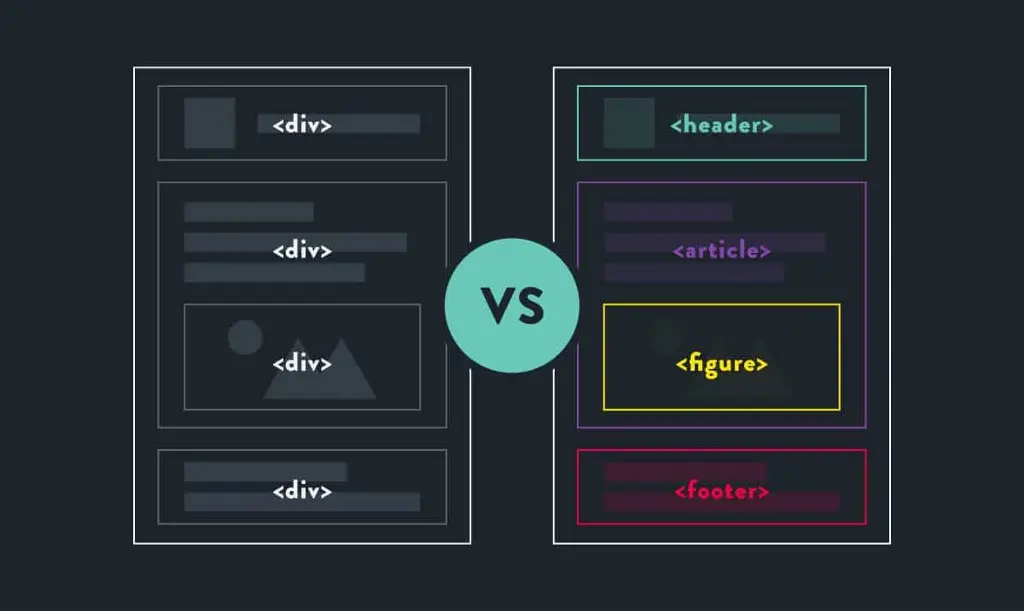
Every student have written HTML at least once in their lifetime. In 5th standard, the best magic we saw on computer was "marquee" tag. Also we learnt that there is something like "h1, h2" and so on. What does these means?
One other thing we learnt back then was a "div" tag, and we understood that this makes a box where we can write stuff and such without telling us what that box can do.
HTML is supposed to give the skeleton of the web page but back then it wasn't able to specify different organs of it. We made a page with 5 "divs" in it which do not make it clear for a code reader what is actually happening in the code. Is it a navigation bar? Is it a footer? Is it main body for the page? Well, you guess.
So, what can we do to give a proper readable structure to our code? We can just make HTML tags which has some meaning, no?
What is semantic HTML?
HTML5 introduced Semantic HTML. By the name itself, it gave us meaningful tags which will be used for particular type of item only. Basically things got easier for both the developer and the browser.
Let's see some of the semantic tags first then we will discuss what are some advantages of HTML5.
Header : This is a container which will have the brand name and will be at the top of the web page.
Nav : This will contain all the navigation links for the web page.
Main : This container has the unique data for each web page which is not repeated in any other page. There should only be 1 main tag in your html page.
Section : This will give you a section in your web page. There can be so many sections describing different parts of your web page but all of them are related to each other. Like you can put introduction, contact info, details in different sections but all of them are ultimately dependent upon each other.
Aside : This container is usually used for a sidebar for the main content.
Article : In article tag, you usually put the content which is not dependent upon the other content of the page, it doesn't need a context. For example like we see a newspaper, all the articles in the newspaper are independent.
Footer : Now this is the last container in a web page where we give links for further contact and credits and such.
<html>
  <head>
  </head>
  <body>
    <header> This is the Header of the page. </header>
    <nav> This container has navigation links. </nav>
    <article> This is an independent article. <article>
    <main>
      This container has main content.
      <aside> This is a sidebar. </aside>
      <section>This is section one </section>
      <section>This is section two </section>
      <section>This is section three </section>
    </main>
    <footer> This is the footer of the page </footer>
   </body>
</html>
See even a layman can read this code easily.
Now let's look at some lesser known semantic tags of HTML.
Details : This is an open-close tag, where you click on a heading and you will get more details about it. By default it is close.
Note : Generally we use details tag along with summary tag for heading.
Summary : Summary tag is used for the heading of details tag. This heading works like a toggle for open and close of the details.
Note : It's the first child of details tag.
Figure : This tag is used to put an image, illustration or a diagram on your web page which will be independent of the other content.
Figcaption : This tag is used so that we can give a caption to some image. Basically what is that image there for, its name or details about it.
Mark : This tag is used as a highlighter in a paragraph or things. It will highlight a particular part of text in yellow color.
<html>
  <head>
  </head>
  <body>
    <header> This is the Header of the page. </header>
    <nav> This container has navigation links. </nav>
    <article> This is an independent article. <article>
    <main>
      This container has main content.
      <aside> This is a sidebar. </aside>
      <section>
        <details>
         <summary>Semantic HTML </summary>
         <p><mark>Semantic HTML</mark> gives meaning to the webpage rather than just presentation.
         </p>
        </details>
      </section>
      <section>
        <figure>
          <img src="" alt="">
          <figcaption>This is the name of the image.</figcaption>
        </figure>
      </section>
    </main>
    <footer> This is the footer of the page </footer>
   </body>
</html>
Advantages
Understandability
Semantic HTML makes a new developer understand an old code really easily because each tag is used for a particular part of the page which has some meaning.
Searching
If a developer wants to update a part of the code, he/she can easily search for the relevant tag rather than going through a list of divs or spans.
SEO
Search engine optimization is better as web crawlers now can parse through certain keywords and understand the website content easily.
Accessibility
Screen readers who helps the visually impaired users can use these tags to navigate to different part of the page in a more efficient way.
Conclusion
Basically, semantic HTML means that your site architecture separates its presentation from its content. For a long time, developers struggled with HTML because it has no structure but with HTML5, we got better at it. So every developer now should make use of these meaningful tags.
Hope you learnt something from this article. Do let me know in the comments and keep coding!
Let's connect at